Official Zigbee2mqtt support is finally here for the Shelly BLU Remote Control ZB, so let’s see how this new remote can be used in Home Assistant.
Official support in the production version of Z2M was added 1/2-26, so I haven’t had enough time to make a proper review of the device, instead this is a small guide on how to use the Shelly BLU Remote Control ZB with Home Assistant.
You can buy the Shelly BLU Remote Control ZB using this Affiliate link.
The Shelly BLU Remote Control ZB comes with 4 zones, where you can press on/off and and a wheel where you can scroll up or down. This makes it practical for controlling 4 light zones, but you can also configure it to control other stuff. When used with BLU the remote have more features, but I am only focusing on the Zigbee integration, and for now, that’s a little more basic.
Before parring the device with Zigbee2mqtt, make sure you have the latest version of Zigbee2mqtt.
Parring is very easy. Permit new devices in Z2M, press the “off” button on the remote 5 times really fast, and it will pair. You can also use another button, but you have to press it 5 times without any beeps between the presses. After parring the device, I suggest you rename it to something that makes sense to you.
Now to the tricky part. The Shelly BLU Remote Control ZB is bound to group id 1,2,3, and 4 from the factory. As of now, you cannot unbind these groups on the remote, and that leaves you with a choice of 2:
1. Use the built-in bindings and create groups in Z2M with IDs 1-4, and use the remote to control them. This will work right out of the box, no need to do anything, the remote will turn on/off light, and adjust brightness then you scroll the wheel.
2. Delete groups in Z2M with ID 1,2,3, and 4. The remote wont control anything out of the box when you do that. This will be your choice for using the remote with Home Assistant or another smart home platform. You can create the groups with new IDs and the same name, and Home Assistant catches the change so you don’t have to update all your automatons etc.
This behavior can be very inconvenient if you already use the Z2M groups 1-4 for other purposes, but right now, there is nothing to do about it. We have to wait for a firmware update from Shelly that fixes this. Please note, that if you keep a light group at group id 1, and go to Home Assistant and make an automation that also captures group 1 events, both things will happen, so you can combine this, but it will be confusing for the casual user to troubleshoot. The advanced user can combine the functionally by keeping some groups created in Z2M, and deleting others and using Home Assistant to control the more advanced stuff.
For the rest of this article, I assume you went with option 2, and deleted group 1-4 in Z2M, to make Home Assistant completely responsible for capturing the remotes inputs.
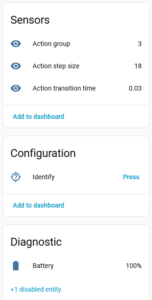
Here is the entities in Home Assistant.
Action group is the zone/group you choose on the remote.
Action step size is how much you scrolled. This will be unknown when you press the on/off buttons.
Action transition time can be ignored.
You can press the identify button and your remote will play a few bib sounds. This can come in very handy if you have multiple remotes in your home, or if you cannot find the remote.
I have created this automation, that should provide a good template for controlling both light and other stuff as well.
For brightness control, it’s not as simple as I hoped, but I think it’s OK. You can control the wheel sensitivity by changing the “3” to a higher or lower number. A higher number will provide a higher change.
The logic may seem a little upside down, but this way you can keep everything inside a single automation.
alias: Shelly Remote Control
description: ""
triggers:
  - domain: mqtt
    device_id: 52ae23ab5875a749ae481e4ebf5e3335
    type: action
    subtype: "off"
    trigger: device
    id: "1"
  - domain: mqtt
    device_id: 52ae23ab5875a749ae481e4ebf5e3335
    type: action
    subtype: "on"
    trigger: device
    id: "2"
  - domain: mqtt
    device_id: 52ae23ab5875a749ae481e4ebf5e3335
    type: action
    subtype: brightness_step_up
    trigger: device
    id: "3"
  - domain: mqtt
    device_id: 52ae23ab5875a749ae481e4ebf5e3335
    type: action
    subtype: brightness_step_down
    trigger: device
    id: "4"
conditions: []
actions:
  - choose:
      - conditions:
          - condition: trigger
            id:
              - "1"
        sequence:
          - choose:
              - conditions:
                  - condition: state
                    entity_id: sensor.shelly_remote_control_action_group
                    state:
                      - "1"
                sequence:
                  - action: light.turn_off
                    metadata: {}
                    target:
                      entity_id: light.living_room_bulbs
                    data: {}
      - conditions:
          - condition: trigger
            id:
              - "2"
        sequence:
          - choose:
              - conditions:
                  - condition: state
                    entity_id: sensor.shelly_remote_control_action_group
                    state:
                      - "1"
                sequence:
                  - action: light.turn_on
                    metadata: {}
                    target:
                      entity_id: light.living_room_bulbs
                    data: {}
      - conditions:
          - condition: trigger
            id:
              - "3"
        sequence:
          - choose:
              - conditions:
                  - condition: state
                    entity_id: sensor.shelly_remote_control_action_group
                    state:
                      - "1"
                sequence:
                  - action: light.turn_on
                    metadata: {}
                    target:
                      entity_id: light.living_room_bulbs
                    data:
                      brightness_step: >-
                        {{
                        states('sensor.shelly_remote_control_action_step_size')
                        | float * 3 | default(128) | int }}
      - conditions:
          - condition: trigger
            id:
              - "4"
        sequence:
          - choose:
              - conditions:
                  - condition: state
                    entity_id: sensor.shelly_remote_control_action_group
                    state:
                      - "1"
                sequence:
                  - action: light.turn_on
                    metadata: {}
                    target:
                      entity_id: light.living_room_bulbs
                    data:
                      brightness_step: >-
                        {{
                        states('sensor.shelly_remote_control_action_step_size')
                        | float * -1 * 3 | default(128) | int }}
mode: queued
max: 3
A cheap Zigbee remote for controlling Home Assistant, was just what I wanted. I will do a full review of the device, when we have used it sufficient to draw conclusions.
Right now, we use 3 of the zones for controlling light, and the last zone for “other stuff”. We have a Home Assistant Voice Preview Edition in the kitchen, and we cannot wake it from the couch, since the distance is too long. But we can wake it from the Shelly BLU Remote Control ZB and then have a fine conversation, and I think that will be a big thing for the hardcore privacy focused people, so they can disable the wake word and the always listening feature.
You can buy the Shelly BLU Remote Control ZB using this Affiliate link.